Batch Rename
Rename multiple files at once using template variables with XMP sidecar support.
 0:33
0:33Rename many files at once from a template. Their XMP sidecars and voice notes are renamed with them.
Opening the Rename Dialog#
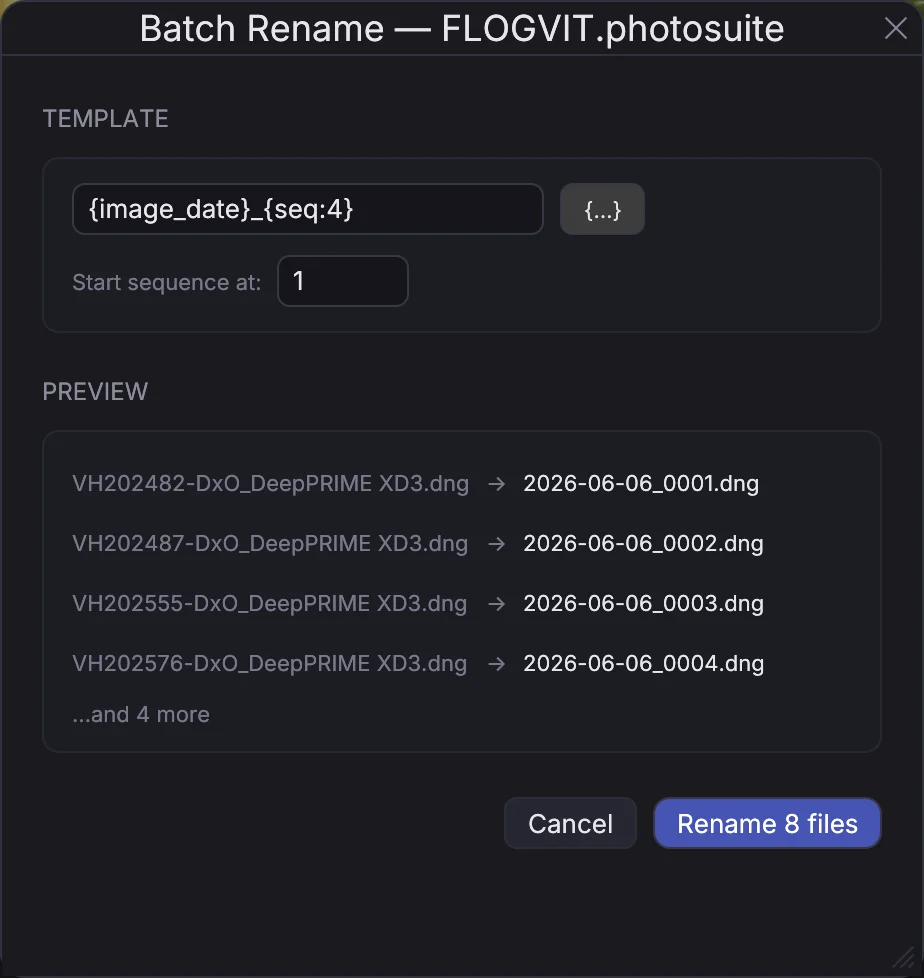
Press Ctrl+Cmd+R or go to File → Batch Rename.... The dialog renames the selected pictures, or every picture the window shows when one or none is selected.
Rename Template#
Write the new name without the extension; each file keeps its own:
{image_date}_{camera}_{seq:4}
This produces filenames like 2026-02-19_NIKON_Z9_0001.NEF. The variable picker beside the field lists every variable; these are the ones used most.
Available Variables#
When the picture was taken:
{image_date}— date (YYYY-MM-DD){image_time}— time{image_year},{image_month},{image_day}— the parts of the date{image_hour},{image_minute},{image_second}— the parts of the time
{date}, {time}, {year} and the rest without image_ are today, the day you rename.
Camera & Lens:
{camera}— Camera model{make},{serial}— maker and serial number{lens}— Lens model{focal}— Focal length{aperture},{shutter},{iso}— Exposure settings
File:
{original}— Original filename (without extension){folder}— Parent folder name{dimensions},{width},{height}— Image dimensions
Sequence:
{seq}— a running number with four digits{seq:N}— a running number with N digits (e.g.,{seq:3}→001)
Metadata:
{rating}— Star rating{colorclass}— Color label name{caption},{headline},{keywords},{creator},{city},{country}— IPTC fields{photographer},{project}— your own variables
Sequence Numbering#
Start sequence at sets the first number; it counts up by one per picture, in the order the window shows them.
Live Preview#
Preview shows the old and the new name of the first pictures as you type. Rename N files renames them, and Edit → Undo gives them their old names back.
Sidecars and voice notes#
A picture's XMP sidecar and voice note are renamed with it, to the same new name. You never need to rename them by hand. Albums, the library and the folder's own state follow the new names.