Multi-Monitor
Pop-out panels, dual fullscreen, light table, and second preview window.
FLOGVIT.photosuite is built for photographers who use more than one screen. Pop out panels, run dual fullscreen, or use a second display as a light table.
Colours on each monitor#
With colour management on and no display profile chosen in Settings → Color, a picture is shown in the colour profile of the monitor the main window is on, on a Mac and on Windows. Move the window to a wide-gamut screen and the colours follow it.
Pop-Out Panels#
Every panel except the viewer can have its own window: Folders, Filmstrip, Sidebar, Histogram, Develop and Scopes.
- Go to Window → Pop Out Sidebar Panel (or any other panel)
- The panel leaves the dock and opens in its own window, with all its controls
- Move the window to your other screen
The Develop panel works from its window too — its sliders, masks and the spot tool on the picture. Close the window, or choose the same menu item again, to put the panel back in the dock.
Dual-Monitor Fullscreen#
Run different views on each screen at the same time:
- Screen 1: the grid, for overview and selection
- Screen 2: the selected picture, full size
As you move through the grid on screen 1, the picture on screen 2 follows. Turn it on with Window → Dual-Monitor Fullscreen (Option+F); it needs two displays. Press Escape or close the picture window to leave it.
Light Table#
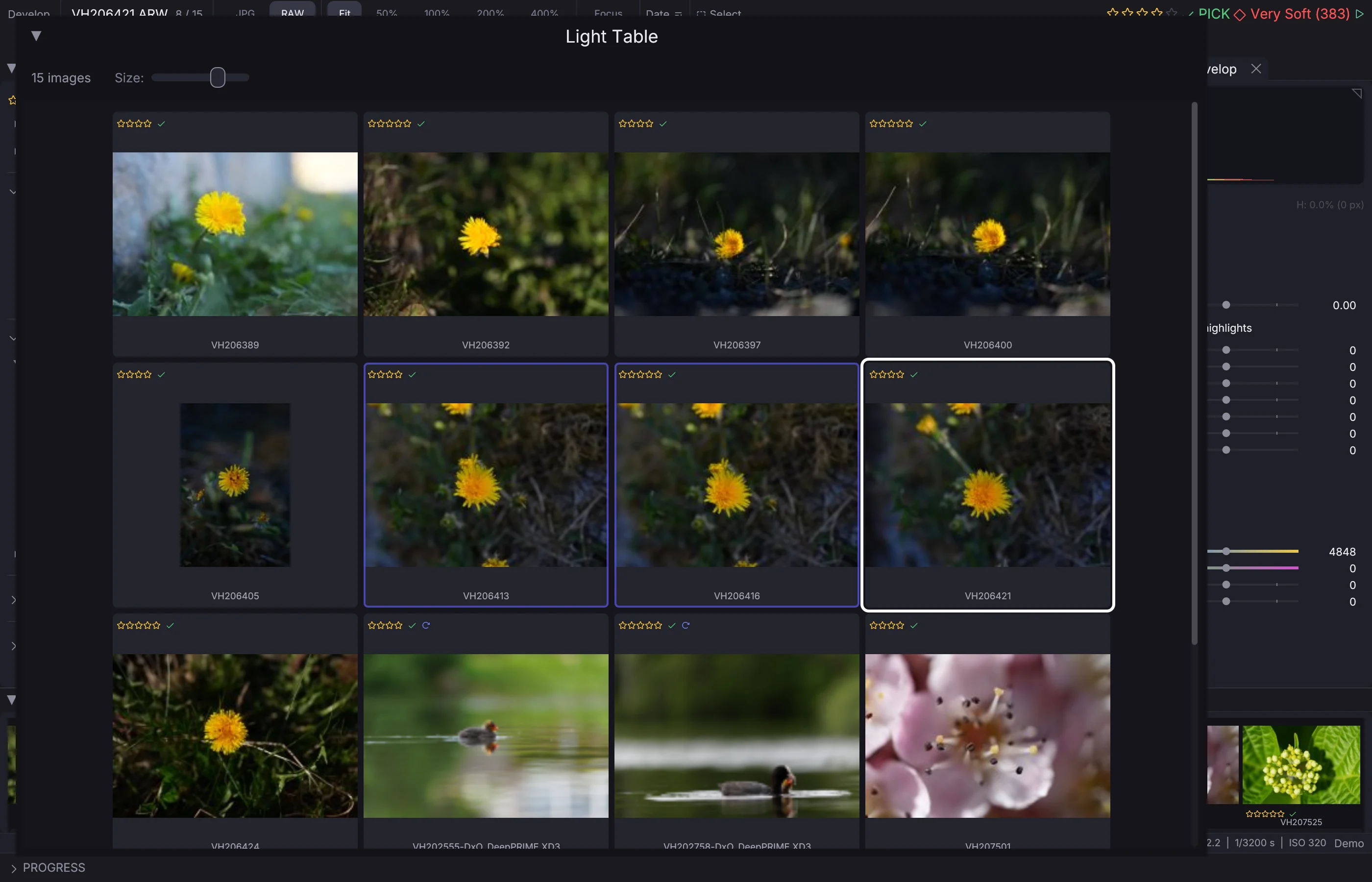
Window → Light Table (Option+L) opens a window of large thumbnails — the pictures the filter shows, with their stars, flags and labels. Set the size with the Size slider. Click a picture to select it, and right-click it for the same menu as in the grid.
Preview Window#
Window → Preview Window (Option+W) opens a window with the selected picture, drawn as the develop view draws it: the same edits, crop and exposure. It follows the selection in every view, the grid included. It is a lighter alternative to dual-monitor fullscreen — just an extra window you can put anywhere.
Window Management#
FLOGVIT.photosuite includes built-in window management:
- Tile — Arrange windows side by side
- Fill — Expand window to fill the screen
- Center — Center and resize to a default size
- Move to Screen — Quickly move a window between monitors
Access these from the Window menu or use the keyboard shortcuts.
Tab Toggle#
Press Tab to hide all panels at once — sidebar, filmstrip, folder tree — leaving just the image. Press Tab again to bring them back. This works in both single and dual-monitor modes.